Blog
Three Ways to Spin a Fan in Unreal Engine
Blueprint Tick, Rotating Movement Component, and World Position Offset compared
On this page
Going over ways to spin objects in Unreal, their pros and cons and some profiling data between Blueprint tick transform, rotating component on actor and WPO rotation.
The comparison could not play. Open the visual clip or open the collision clip.
Drag the slider on the video to swtich between Collision view and Lit view
Which method should I use?
- Blueprint Tick when you need realtime control over the rotation and/or collision to be updated.
- Rotating Movement Component for continuous spin when gameplay mainly changes the speed and axis.
- World Position Offset (WPO) for decorative fans where accurate blade collision matters little. Around 10–20 visual-only fans is where I’d start profiling WPO against transform rotation. The performance benchmark uses 400.
Blueprint Tick
Use case: when the blade collision accuracy matters or where i want to update the behavior in realtime based on hit/damage/quest logic.
Setup. Connect Event Tick to Add Actor Local Rotation. The graph below turns one degree per tick. For a steady speed, multiply degrees per second by Delta Seconds instead. If the housing stays still, rotate a separate blade component with its pivot at the hub.
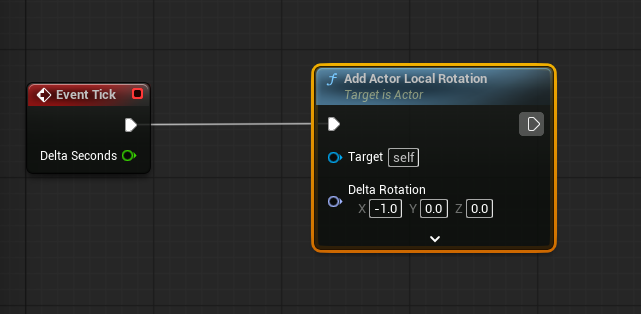
Collision. It follows the transform. For a fast moving “trap” you might want to check whether the blade skips contacts between frames.
Rotating Movement Component
Use case: when the fan keeps spinning and maybe when gameplay needs to changes the speed or simple on/off
Setup. Add a Rotating Movement Component, enable Rotation in Local Space, and set Rotation Rate around the shaft axis. Use Set Updated Component if the blades have their own component. A Timeline can wind the fan down when the power goes out.
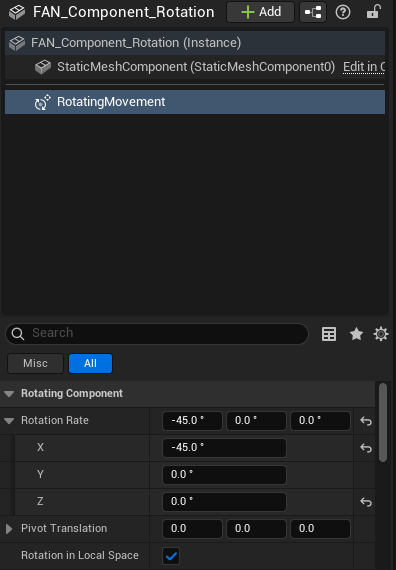
Collision. It follows the updated component.
Material World Position Offset
Use case: it’s my favorite method for decorative fans that need to spin visually or when I can get away with non accurate collision hits.
Setup. Feed the normalized world-space shaft axis and the hub pivot into RotateAboutAxis. Drive the angle with Time × Speed and plug the result into World Position Offset (WPO). WPO rotates the vertices only, so rotate the normals by the same axis and angle to keep lighting aligned with the blades. Connect the world-space normal output to Normal and disable Tangent Space Normal on the material.
Hint If the cast shadow clips on Nanite, increase Max World Position Offset Displacement in the material or instance enough to cover the full rotation.
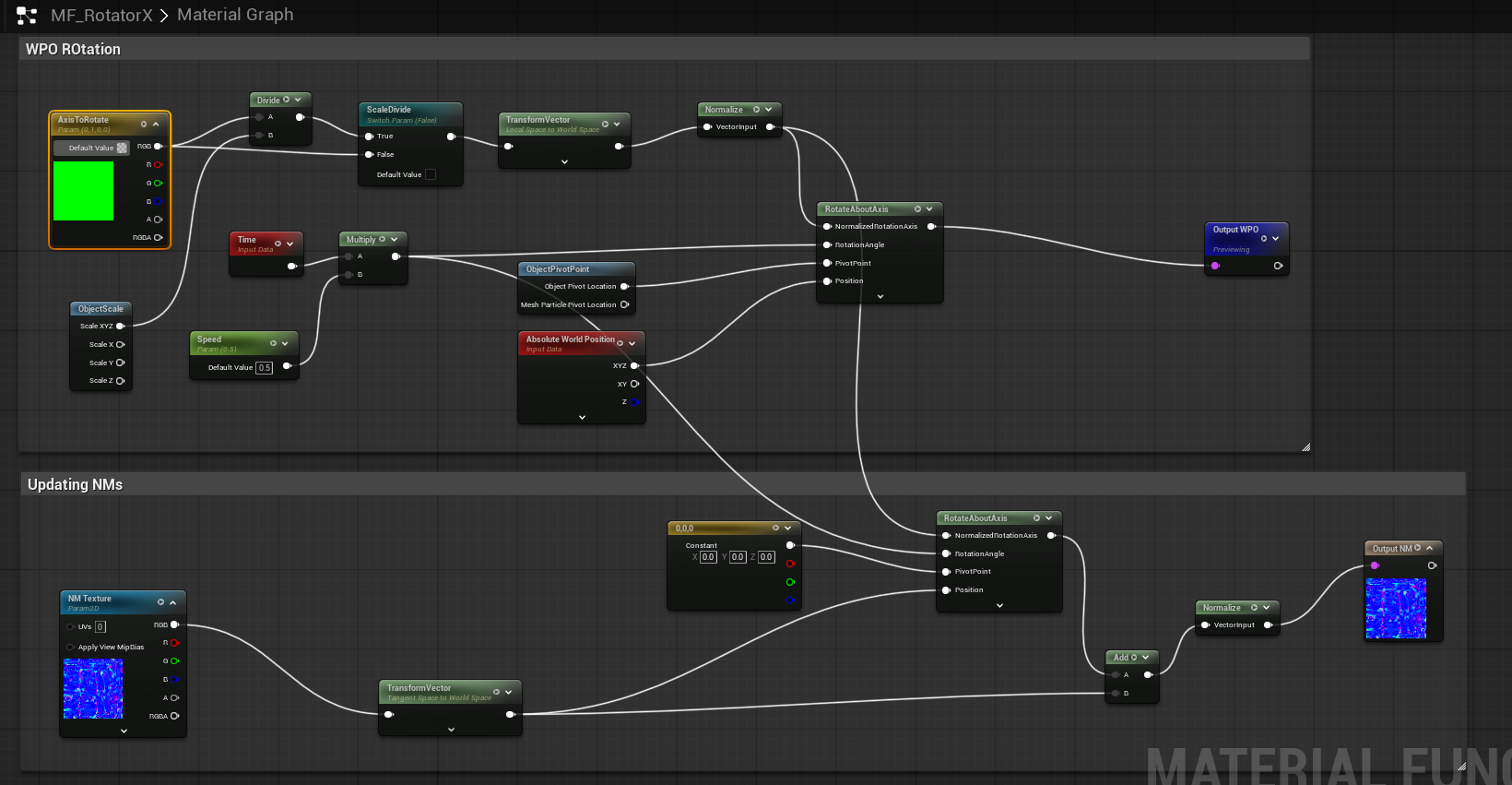
Collision. It stays at the original pose while the rendered blades spin.
For another use of WPO, see how I bake deformation into vertex colors in Houdini and reconstruct it in Unreal.
Performance benchmark
I used 400 copies of the same fan so the per-fan work would add up enough to measure. With a single fan, small differences between rotation methods can get lost in normal frame-to-frame variation.
The game-thread column measures the whole editor frame, including the rest of the scene and any waits. The static scene with 400 fans already took 8.31 ms/frame, and the WPO scene took 8.33 ms/frame. The on/off test below measures what changed when I enabled WPO on the same material in the same scene.
| 400 fans | Whole game-thread frame (ms) | CPU rotation ticks (ms/game frame) | GPU scene rendering (ms/frame) |
|---|---|---|---|
| Static | 8.31 | — | 7.61 |
| Material WPO | 8.33 | — | 7.69 |
| Rotating Movement Component | 13.43 | 3.71 | 10.89 |
| Blueprint Tick | 13.84 | 5.60 | 10.47 |
CPU rotation ticks are part of the whole game-thread frame. For example, Rotating Movement measured 13.43 ms for the whole frame and 3.71 ms in its rotation ticks. Static and WPO have no per-fan CPU rotation tick. The component’s whole-frame medians ranged from 11.89 to 24.57 ms across the three windows.
WPO on vs. off in the same map. Enabling WPO raised the GPU ShadowDepths timer by about 0.15 ms/frame across four paired windows. The paired median change in total GPU frame time was +0.01 ms/frame.
How I tested
I used Unreal Engine 5.8.4 on an RTX 3080 in realtime editor simulation. Each level had a 20×20 grid of the same Nanite mesh, a floor, an overhead directional light, and a fixed camera. The table and rotation-tick summaries report the median of three 3-second window medians per method, with 100 ms trimmed at each end. Each screenshot shows one full, untrimmed window. I ran the captures in a separate editor process while the working editor stayed open. Static and WPO used different materials. The transform-driven levels used movable meshes. The WPO material used world-space normals and a 900 cm displacement override.
Blueprint Tick timings
Across the three trimmed windows, the Blueprint actor ticks for 400 fans took a median 5.60 ms per game frame, including the transform updates.
View Unreal Insights trace

Full capture window. The Blueprint actor tick measured 5.577 ms per game frame in I.Med.
Rotating Movement Component timings
The component runs in C++ and updates the transform each frame. The screenshot below shows the movement ticks summed per game frame for one full capture window.
View Unreal Insights trace

Full capture window. Rotating Movement measured 3.700 ms per game frame in I.Med.
Material WPO timings
WPO has no per-fan rotation tick. Across all 1,005 measured GPU frames per setup, scene rendering averaged 7.55 ms/frame for both Static and WPO. The main table uses the median of the three trimmed window medians. The screenshots show one full capture window. The on/off test above measures the change in shadow rendering and whole-GPU-frame time when WPO is toggled on the same scene and material.
View full capture windows in Unreal Insights
Read the I.Med column for the inclusive median in milliseconds. FEngineLoop::Tick measures the whole game-thread frame. SceneRender measures GPU scene rendering. The on/off test above uses the whole GPU frame timer for its +0.01 ms/frame result.
Static
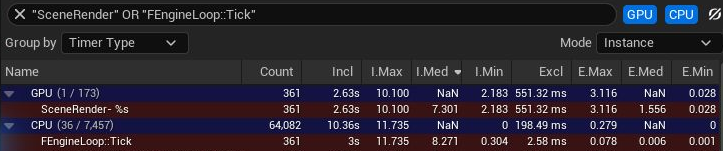
Static measured 8.271 ms on the game thread and 7.301 ms for GPU scene rendering.
Material WPO
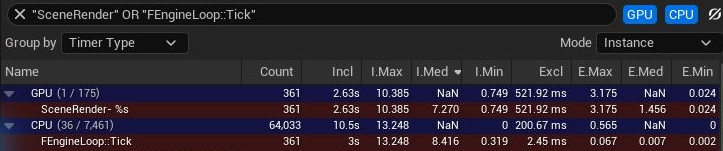
WPO measured 8.416 ms on the game thread and 7.270 ms for GPU scene rendering.
/Andrei